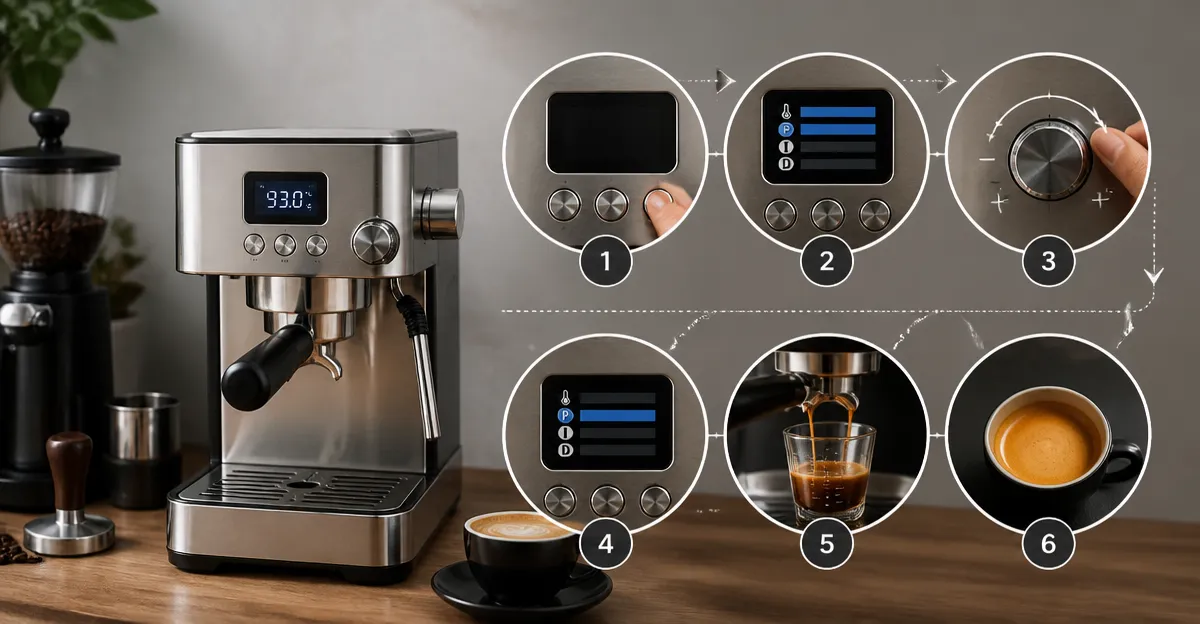
How to Tune PID Presets on Compact Espresso Machines: Step‑by‑Step Guide to Perfect, Consistent Shots
Introduction
Achieving a consistently excellent espresso shot depends on precise temperature control. Modern compact espresso machines use a PID (Proportional‑Integral‑Derivative) controller to maintain water temperature within a narrow band, but the factory presets are not always optimal for every bean or roast level. This guide explains how to understand, adjust, and verify PID presets so that the machine delivers the ideal extraction temperature for your preferred coffee profile. By following the steps, readers will reduce bitterness, improve crema formation, and enjoy café‑quality drinks at home.
The instructions are written for intermediate home baristas who already know how to grind, dose, and tamp. No advanced electronics knowledge is required; the process relies on built‑in displays, simple temperature probes, and a few common accessories. The guide also recommends reliable tools that simplify each stage while remaining affordable.
What You’ll Need
- CASABREWS MARENZA – All‑in‑one machine with LCD temperature readout and 20‑bar pump (price $349.99, rating 4.6/5).
- AMZCHEF Espresso Machine – Precise 190‑201 °F control and 44 grind settings (price $189.99, rating 4.3/5).
- Breville Barista Express – PID‑controlled boiler with integrated grinder (price $694.94, rating 4.4/5).
- Digital thermocouple or infrared temperature gun (not listed; any reliable kitchen thermometer will work).
- Precision tamper, scale (0.1 g), and a clean espresso cup.
Step‑by‑Step Instructions
1. Understand the Role of PID in Espresso Extraction
The PID controller continuously adjusts heating power to keep water temperature stable during the brew cycle. A stable temperature between 195 °F and 205 °F (90 °C‑96 °C) is essential because even a 2 °F deviation can alter solubility, leading to over‑extraction (bitter) or under‑extraction (sour). Knowing the target range for your bean will guide the preset adjustments.
For light roasts, aim for the higher end of the range; for dark roasts, a slightly lower temperature preserves sweetness. Record the manufacturer’s default temperature (often displayed on the machine’s LCD) before making any changes.
2. Prepare the Machine and Gather Baseline Data
Turn on the chosen espresso machine and allow it to reach full heat. The CASABREWS MARENZA displays real‑time temperature on its LCD, making it easy to note the baseline. Use a digital thermocouple to verify the water temperature at the group head; place the probe in the stream just before it reaches the portafilter.
Document the temperature reading, the brew time, and the taste of a test shot. This data serves as a reference point for later adjustments.
3. Access the PID Settings Menu
Most compact machines hide PID parameters behind a service or calibration menu. On the AMZCHEF Espresso Machine, press and hold the temperature button for five seconds to enter the PID adjustment mode. The LCD will show a numeric value that can be increased or decreased with the plus/minus buttons.
Consult the user manual for the exact key sequence; many manufacturers provide a PDF on their support site. If the machine does not expose PID values, you can still fine‑tune the brew temperature by adjusting the built‑in temperature offset (often called "Temp‑Comp").
4. Adjust the Temperature Offset
Increase the offset by 2 °F if the test shot tasted thin or under‑extracted. Decrease by 2 °F if the shot was overly bitter. After each change, run a new shot and record the thermocouple reading. It is advisable to adjust in small increments; the PID will compensate for larger jumps, but overshooting can cause the machine to enter over‑heat protection.
For example, if the baseline was 197 °F and the shot was sour, raise the offset to +2 °F, resulting in a target of 199 °F. Brew again and compare. Continue until the taste matches the desired profile.
5. Verify Consistency Over Multiple Shots
Consistency is the ultimate test of a well‑tuned PID. Pull at least three consecutive shots using the same dose (e.g., 18 g) and record temperature, extraction time, and taste. The temperature should vary by no more than ±0.5 °F between shots.
If variation exceeds this range, check the water tank temperature (cold water can cause fluctuations) and ensure the machine’s heating element is not obstructed by mineral buildup. Descaling, as described in the maintenance section of the Breville Barista Express manual, often resolves such issues.
6. Fine‑Tune Milk Frothing Temperature
While PID primarily controls brewing water, many baristas also want consistent milk steaming temperature (typically 150 °F‑155 °F). The CASABREWS MARENZA includes a steam‑temperature indicator on its LCD. Adjust the steam‑temperature offset in the same manner as the brew offset, using a milk thermometer to verify.
Properly textured microfoam requires a stable steam temperature; otherwise the milk may scorch or remain too cool, affecting latte art and flavor.
7. Save the Preset and Document Your Settings
Once the desired temperature range is achieved, save the preset if the machine supports memory slots. The AMZCHEF Espresso Machine allows up to three user profiles, enabling quick switching between light‑roast and dark‑roast settings.
Write down the final offset values, the bean type, roast level, and grind size in a coffee log. This documentation speeds up future adjustments when you change beans or ambient temperature.
Tips & Pro Tips
- Perform PID tuning after the machine has been used for at least a week; the boiler stabilises over time.
- Use filtered water to minimise mineral buildup, which can cause temperature drift.
- When changing beans, re‑measure the extraction temperature; different origins may require a 2‑4 °F shift.
- Allow the machine to cool completely before making large adjustments; this prevents the over‑heat protection mode from activating.
- Consider a dedicated temperature‑stable environment (e.g., a kitchen with consistent ambient temperature) for the most reliable results.
Troubleshooting
| Problem | Possible Cause | Solution |
|---|---|---|
| Temperature spikes >2 °F between shots | Scale buildup in boiler | Descale using the manufacturer’s descaling solution; run a full cleaning cycle. |
| PID menu inaccessible | Machine firmware locked | Contact the brand’s support; many provide a service code for unlocking. |
| Steam wand too hot, milk scorches | Steam‑temperature offset set too high | Reduce steam offset by 2 °F and verify with a milk thermometer. |
| Shot extraction time too short | Water temperature too low | Increase brew temperature offset by 2 °F and re‑test. |
Conclusion
By understanding how PID controllers regulate temperature and following the systematic adjustment process, one can transform a compact espresso machine into a precision brewing tool. The steps outlined above—baseline measurement, incremental offset changes, consistency verification, and documentation—ensure that every shot meets the desired flavor profile. Whether using the feature‑rich CASABREWS MARENZA, the temperature‑focused AMZCHEF Espresso Machine, or the classic Breville Barista Express, the principles remain the same. Apply the guide, keep a coffee log, and enjoy consistently perfect espresso without the need for costly café visits.
Products Mentioned in This Guide
Frequently Asked Questions
What is a PID controller and why is it important for espresso machines?
A PID controller continuously adjusts heating to keep water temperature within a tight range, ensuring consistent extraction and better flavor.
How can I access and change the PID presets on my compact espresso machine?
Enter the machine’s service or settings menu via the built‑in display, navigate to the temperature or PID section, and use the up/down buttons to adjust the preset values.
What temperature range should I aim for when tuning PID presets for different roast levels?
Light roasts typically extract best around 92‑94 °C, medium roasts around 93‑95 °C, and dark roasts near 90‑92 °C, but fine‑tune by tasting.
Do I need any special tools to verify the new PID settings?
A calibrated digital thermometer or a thermocouple probe with a compatible adapter lets you confirm the actual brew temperature matches the preset.
How often should I recalibrate or adjust my PID settings?
Re‑adjust after changing beans, roast profiles, or noticing a shift in taste; otherwise, a quarterly check is sufficient.